By Sylvain Glaize.
Let's go back a bit. From our earliest discussions on the project, there was the idea of creating a Micral N simulator, for two main reasons.
The first is, in the long term, to offer everyone the chance to virtually handle this rare machine. Secondly, to be able to study a machine that we didn't yet know about and of which we didn't know if our copy was functional or even complete.
Having a simulator, or emulator whatever you want to call it, means being able to work on a replica of a precious machine, without the risk of damaging it.
This enables parallel progress to be made between the real machine and its double.
Later, after studying the detailed physical composition of this Micral N, we will be able to validate the interest of the simulator. We're missing the connection cables between certain cards, so we're going to have to rebuild them. And to do that, we need to understand exactly how the cards communicate with each other.
Simulate the 8008
A processor can be simulated at several levels. At the very bottom, in detail, you can use an FPGA to reproduce its structure. Much higher up, you can simulate the changes of state due to the execution of each machine instruction. I'm starting from an intermediate level: a simulation of state changes after each processor 'state'.
This is a way of simulating processor signals in some detail and understanding how they work in detail. The official 8008 documentation helps in that it contains a table of these states and the basic operations performed by the processor in each of these states.

And this translates quite naturally into data describing the operation of the processor, step by step.
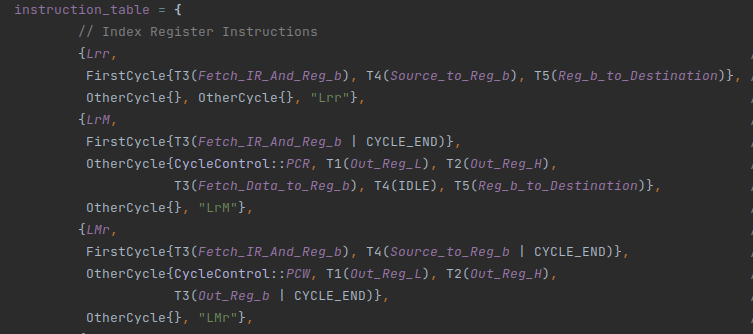
The simulator's execution is timed by a scheduler, which indicates which simulated components should be notified each time the system's state changes. If this component in turn causes a change in system state, it tells the scheduler when this change will occur.
Here again, with a good knowledge of the system, it would be simpler to have a fixed scheduler that knows who talks to what and who reacts to what. If you don't know the system, an architecture where each component talks to the scheduler allows you to be flexible, at the cost of a certain slowness. But for a processor running at 500 kHz, it's fine; even on a Raspberry Pi 4.
Coating
To launch the emulator, two 'wraps' are provided.
The first wrapper is a mode with no direct interaction, but which we can imagine opening a serial port or interfacing with BlinkenBone (http://retrocmp.com/projects/blinkenbone), an architecture that enables interaction with luminous control panels, whether replicas or real.
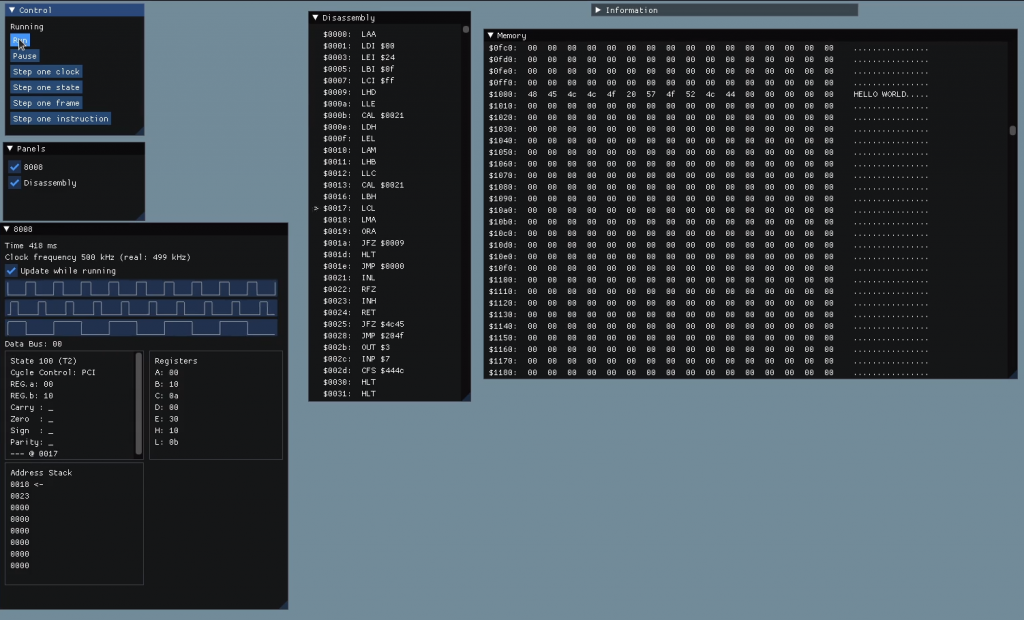
The second wrapper is an interactive mode with numerous windows, for viewing the status of the machine, the contents of its memory and reproducing the front control panel. This will be the main mode used throughout the research. This version uses the indispensable Dear ImGui library (https://github.com/ocornut/imgui) for the graphics.
The simulator is designed in such a way that it is possible to imagine other coatings at a later date. It is entirely conceivable and envisaged to have a simplified user version to introduce the machine. On the Web, for example, with scenarios and explanations of how it works. But let's not get ahead of ourselves.
Here is one of the first screens in the programme:
Reproduce a map
To reproduce a map is to understand it. As a basis, there's the documentation. But the documentation we have does not cover all the boards in the Micral N configuration. Another vector of understanding: the operation of the Pluribus. This bus is passive; it simply transmits electrical information to the cards (and supplies them with the necessary electrical power). However, even though it is passive, Pluribus describes an interface: a set of rules and constraints on the signals that the cards must respect. And this is valuable information.
So we know the different important moments in the system. The moment when the processor card requests data and the moment when the data arrives, for example. We can be sure that the cards respect these contracts.
Another vector of understanding is the physical boards themselves. It's quite tedious, but thanks to scans we've made of the boards and by visually following the tracks linking the components, we can refine our idea of how the board works. Tedious, but not impossible. The boards only have two layers, one on the surface of each side of the board.
The last, and by no means least, major vector of understanding is the content of the two ROMs present in the system, the subject of a previous article. These two ROMs are also functional elements of the system. Executing them will validate that operations are running correctly.
When the mental model of the map reaches a certain level that seems functional, it is time to implement a first version in the system. Lessons are learned from this version, sometimes leading to a reconsideration of the theories put forward. And little by little, by cross-referencing all these vectors, a functional model emerges.
There's still a lot to be done at this level of analysis, and we'll come back to the further construction of the simulation programme in a future article.
Don't forget to take part in the campaign to support our work! https://micral.mo5.com
